How many words is a 1-minute video? Words per minute and script length
Published October 1, 2026 · 5 min read
A one-minute talking video holds roughly 130 to 160 spoken words for most people speaking at a relaxed, conversational pace — so a 30-second clip is about 65 to 80 words, and a three-minute video about 400 to 480. The exact number depends on your own speaking speed, which you can measure in one minute with a timer.
This guide shows how to find your words per minute, how to turn any script’s word count into a running time (and back), and what to cut when a script is too long for the slot. It works with nothing more than a timer and a word counter.
How many words do people say in a minute?
Conversational speech in English commonly lands somewhere between about 120 and 170 words per minute. Presenters who slow down for clarity sit at the lower end; energetic short-form creators often sit at the higher end. That is why script-length rules of thumb you find online vary: they are all describing different speakers.
Those ranges are only a starting point. The number that decides how long your video runs is your own pace, at the tone you will actually use on camera — not your fastest reading voice and not someone else’s average.
How do I measure my own words per minute?
- 1Pick a paragraph from a real script of yours, at least 200 words long, so you don’t run out of text.
- 2Set a timer for one minute.
- 3Read aloud at full voice, at the pace and energy you will use when recording. Don’t race.
- 4Stop when the timer ends and count the words you got through. That count is your words per minute (WPM).
- 5Repeat once or twice and take the middle value. Your first try is usually a little fast.
If you record often in two styles — say, calm explainers and quick product clips — measure both. Many people speak noticeably faster when they are excited.
How do I turn word count into video length?
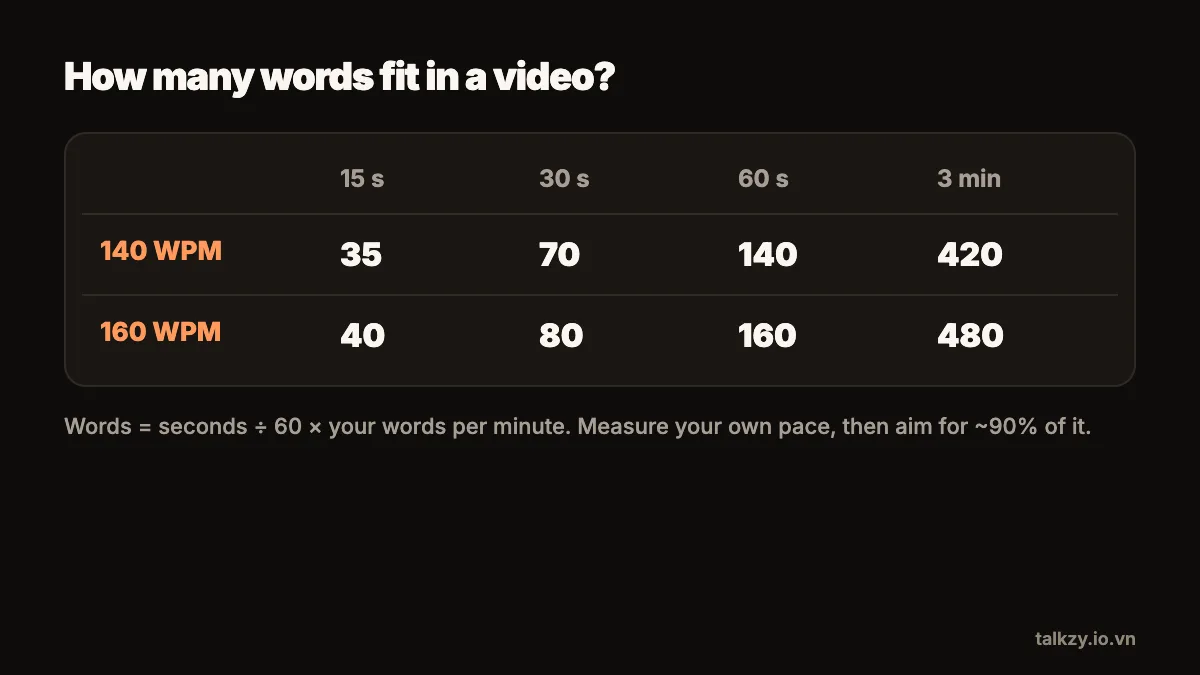
Running time in minutes is the script’s word count divided by your WPM. To go the other way, multiply the length you want by your WPM to get a word budget.
- At 140 WPM: a 15-second clip is about 35 words, 30 seconds about 70, 60 seconds about 140, and 3 minutes about 420.
- At 160 WPM: the same slots hold about 40, 80, 160 and 480 words.
Then leave some room. Pauses for emphasis, a smile before the first line and a beat after the last one all take time, and they are part of what makes a video feel natural. Aiming for about 90 percent of your word budget is a comfortable margin.
Word counters are built into most editors: Pages, Google Docs and Word all show a count, and on iPhone you can paste a script into any of them to check.
Do word counts work the same in Vietnamese?
Mostly, with one difference in how words are counted. Vietnamese is written with a space between syllables, so a word counter counts each syllable (“sản phẩm” counts as two). That makes Vietnamese counts per minute look higher than English ones for the same amount of speech. The method is the same: measure your own pace with the same counter you will use on the script, and the maths stays consistent.
What if the script is too long?
Talking faster is the wrong fix: it makes you stumble and reads as rushed. Cut instead, in this order:
- 1Remove the warm-up. Openings like “Hi everyone, in today’s video I’m going to…” can usually go entirely.
- 2Remove the second example. If one example makes the point, the second is a luxury.
- 3Shorten long sentences. Split them, then delete the half that only repeats.
- 4Remove anything that doesn’t serve the one point of the video.
Read it aloud again with the timer after each pass. Scripts almost always get better shorter.
How do I keep to the pace while recording?
Knowing your WPM helps twice: once to plan the length, and again to set a scrolling teleprompter. Set a timed prompter slightly below your measured pace — it is easier to speed up a slow scroll than to chase a fast one — and adjust between takes. A prompter you control yourself, with a remote or by voice, removes the need to match a fixed speed at all.
Where Talkzy helps
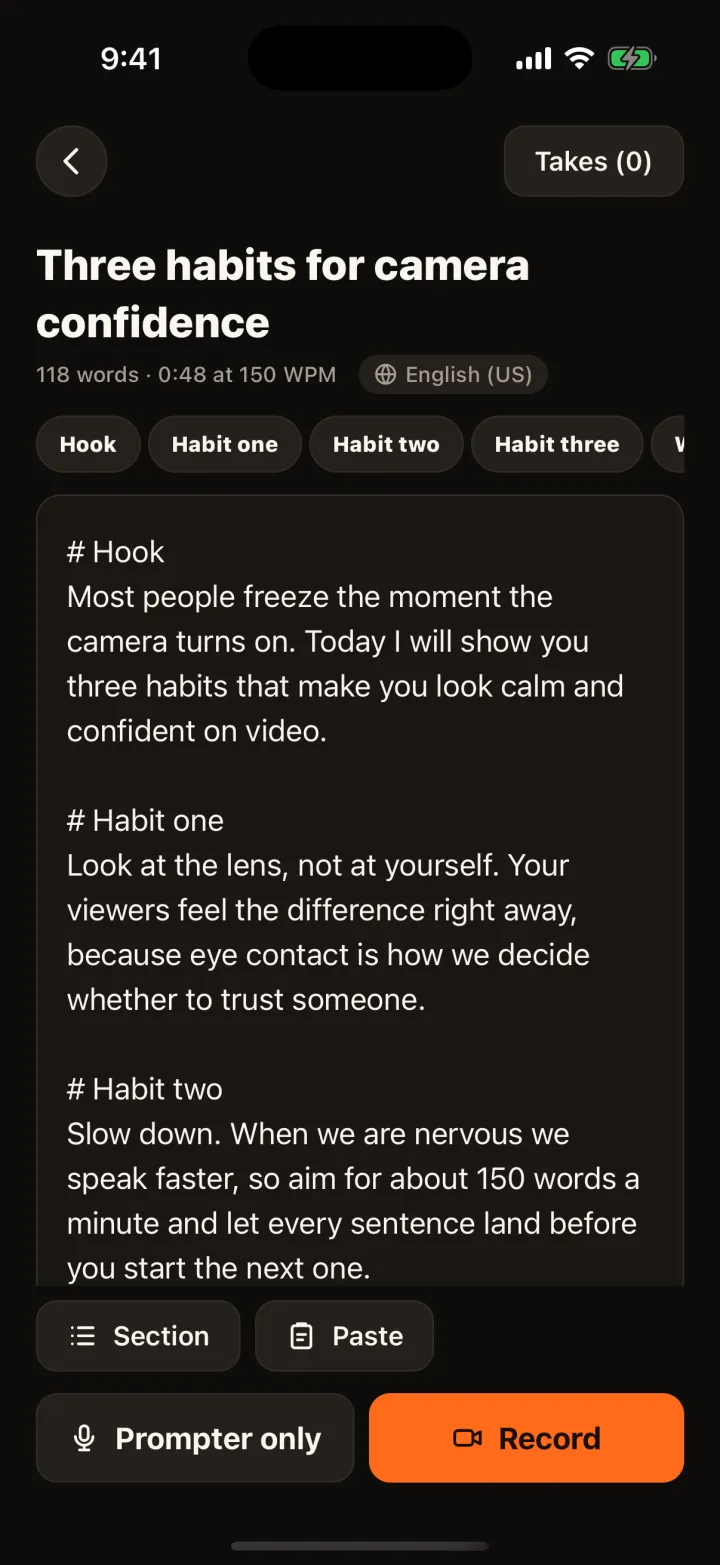
Talkzy shows each script’s word count and estimated read time at the speed you choose, so you can see whether a script fits a 30-second or 60-second slot before you record. Speed is set in words per minute, so the number you measured above goes straight in.
While you read, the prompter shows the time left at your speed. And if you’d rather not match a fixed pace, voice-follow scrolls along as you talk and waits when you pause; speech recognition runs on the device.